Blog
How to sell software online and keep your profits
Selling software online in 2026 means competing with polished SaaS checkouts, instant license delivery, and buyers who abandon any flow asking for a phone number. This guide covers the billing model decision, license keys, refund policy basics, sales tax, and the trade-offs between selling direct

Selling software in 2026 looks nothing like it did a decade ago. Buyers compare your checkout against Stripe-powered SaaS tools, expect license keys to land in their inbox in seconds, and abandon any flow that asks for a phone number they don't want to give. The good news is that the tools to compete with the polished setups have gotten cheap, fast, and well-documented.
This guide walks through how to sell software online from your own site, blog, or anywhere you can paste a link. We cover license keys, the SaaS versus one-time decision, refund policies and chargebacks, pricing tiers, and the trade-offs between selling direct and listing on marketplaces or app stores.
Why selling direct still wins for most software founders
You can list your product on a marketplace like AppSumo, the Mac App Store, Microsoft Store, or Setapp. Those channels move volume, but they take 15% to 70% of the sale, control the customer relationship, and bury you in queue position. Selling direct from your own site keeps the economics, the data, and the email address.
Direct selling also gives you control over a few things that matter:
- You keep 90% to 95% of revenue after payment processing and delivery fees, instead of 30% to 50% under typical app-store splits
- You own the customer email and can sell upgrades, cross-sells, or annual plans without paying a platform tax
- You set the refund window, the trial mechanics, and the upgrade path
- You can sell beta versions, lifetime deals, or pay-what-you-want tiers without asking permission
- You can block fraudulent buyers by email, IP, or country before delivery happens
The trade-off is that you have to handle delivery, license enforcement, taxes, and chargebacks yourself. A modern delivery platform handles most of that for you.
Pick your billing model first
Before you build anything, decide how the money flows. The choice shapes your pricing, your support load, and your churn.
One-time purchase
A flat fee for a perpetual license. Common for desktop apps, plugins, themes, fonts, and developer tools. Easier to explain, no ongoing churn calculation, but every dollar of growth has to come from new customers or paid upgrades.
Subscription or SaaS
Recurring monthly or annual billing. Predictable revenue, but you carry the support and infrastructure cost forever, and a single billing failure cycle can wipe out a quarter. If you go this route, you need a billing system that handles failed cards, dunning emails, prorated upgrades, and cancellation flows without breaking.
Hybrid
A one-time license plus an optional paid update window or maintenance subscription. Works well for power-user tools where customers want to own the software but also want updates. JetBrains popularized the model, and it's quietly become a standard for indie developer tools.
You don't have to lock this in forever. Plenty of products start as one-time and add subscriptions later, or vice versa. Just don't try to run both side by side until you've validated the simpler option.

Set up payments and delivery
To take money online, you need a payment gateway and a delivery system. They're two different pieces.
Stripe and PayPal are the default gateways for software sellers. Stripe charges 2.9% + 30 cents per US transaction with no monthly fee, supports 135+ currencies, and handles SCA compliance for European cards. PayPal adds an option that some buyers still prefer, especially internationally. Most platforms let you offer both at once.
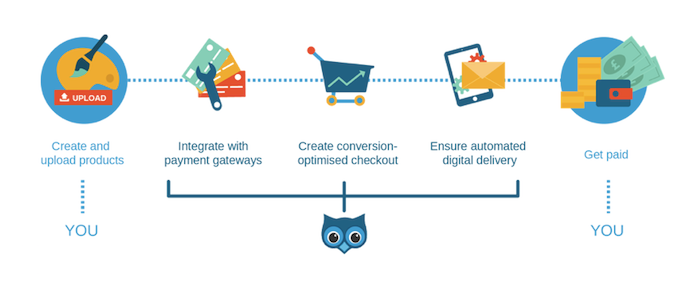
Delivery is where the platforms diverge. A modern digital delivery service connects to your gateway, hosts your installer or build files, generates and emails license keys, and gives the customer a clean download experience that doesn't blow up when they're on hotel WiFi. You can build this yourself, but the maintenance cost compounds fast once you start handling refunds, version updates, and license revocation.
If you want to compare the moving parts before committing, the SendOwl page on selling software online lays out the checkout, license, and delivery flow in one place. For the technical side of how files get to buyers without exposing your storage bucket, secure downloads covers the delivery infrastructure.
License keys without losing your weekend
Software piracy isn't the existential threat some people make it out to be, but a basic license check stops casual sharing and gives you something to revoke if a chargeback comes through.
You have three reasonable options:
- Generate keys on demand using a delivery platform, with a simple key format the buyer pastes into your app
- Pre-generate a batch of keys yourself and let the platform allocate one per order
- Have your own server generate a key when called by the platform, which lets you tie keys to features, seats, or expiry
For most indie products, option one is the right starting point. You can move to option three when you have enough volume to justify the engineering. SendOwl handles all three at no extra cost, with key delivery baked into the post-purchase email. We covered the implementation tradeoffs in detail in our guide to selling codes and license keys online.
A note on enforcement: a license key that phones home on every launch will get cracked within a week if your software has any audience. A key that quietly validates once at install and then trusts the local copy is enough friction to keep honest customers honest, which is the realistic goal.
The customer experience that converts
Your checkout is the single most important piece of your funnel. A 1% bump in checkout conversion is worth more than most marketing campaigns. Make it boring, fast, and mobile-first.
Things that hurt conversion:
- Asking for a phone number, address, or company name when you don't need it
- A separate billing-address page on mobile
- Showing prices in dollars to a customer browsing from Berlin
- Forcing account creation before purchase
- A "thank you" page that doesn't include the download or license key
Things that help:
- A one-page checkout with email, card, and total price visible at the same time
- Apple Pay, Google Pay, and Link for autofilled card-on-file purchases
- Currency localization on the price, not just the checkout
- The download link and license key on the confirmation screen, plus an email with both
- A clear refund policy linked from the checkout
Refunds, chargebacks, and policies you actually need
The dirty secret of digital products is that chargebacks are the real cost of doing business, not piracy. A friendly refund policy almost always saves you money compared to fighting disputes.
A reasonable starting policy: 14-day no-questions refund, no refunds after that unless the software is fundamentally broken on the buyer's setup. Publish it on your checkout, your support page, and the post-purchase email. When someone asks for a refund inside the window, refund them and revoke the license. When they file a chargeback instead of asking, you have a documented policy to submit as evidence.
Chargebacks on digital products are notoriously hard to win because there's no shipping tracking. The PayPal seller protection guide for digital products walks through what evidence helps, what to keep on file, and how to structure your delivery so disputes are at least defensible.
Pricing tiers that scale revenue
Even for a one-time product, a single price leaves money on the table. Three tiers (often called good, better, best) let buyers self-select based on the seats, features, or support level they actually need. The middle tier usually does most of the volume because it feels like the safe default.
A few principles worth applying:
- Anchor with the highest tier first, then let buyers downsize
- Differentiate tiers by capacity (seats, projects, sites) before features when you can
- Annual plans should save the buyer at least two months versus monthly billing
- Don't put critical features behind your top tier if it kills the lower tiers' usefulness
Test the numbers before you commit. Run a willingness-to-pay survey with twenty real customers, look at what comparable tools in your category charge, and accept that your first set of prices is probably wrong. Most software founders raise prices once they have data, almost never lower them.
Sales tax, VAT, and the international reality
If you sell to customers in the EU, UK, Australia, or about 90 other countries, you're on the hook for collecting and remitting some flavor of VAT or GST on digital sales. The thresholds vary by country, but for EU sales, the threshold is effectively zero euros once you cross the OSS rules.
You have two paths: handle it yourself by registering, calculating, and filing in each jurisdiction, or use a merchant of record that becomes the seller for tax purposes (Paddle, Lemon Squeezy, FastSpring, and similar services do this in exchange for a higher fee). For most sellers under $1M ARR, the merchant-of-record fee is cheaper than the accounting cost of handling it manually. Above that, the math usually flips.
Whichever path you take, talk to an accountant before your first international sale rather than after.
Free updates and the support cost they save
Offering free updates to existing customers is partly customer service and partly a support-cost optimization. Customers stuck on old versions file more bugs, hit issues you fixed two releases ago, and generally consume support hours that don't generate revenue.
For one-time products, define an update window upfront (12 months is the most common starting point) and let buyers pay for an extension. For SaaS, every release goes to every customer, so the question instead is how aggressively you push major version migrations.
Affiliates and partners
Once you have a product that converts, an affiliate scheme lets other people sell on your behalf for a revenue share. Pay 20% to 30% per sale, give partners a clean tracking link, and the math works out as long as your acquisition cost was already in that range.
Don't bolt this on too early. You need a converting checkout, a known cost-per-acquisition, and at least one or two natural partners (newsletter writers, complementary tool makers, course creators) before an affiliate program is worth the setup cost.
Putting it together
The honest version of this is: most software founders get stuck on the platform decision and ship six months late. Pick a payment gateway, pick a delivery platform that handles license keys and the post-purchase email, write a 14-day refund policy, and ship.
SendOwl handles the checkout, secure file delivery, license keys, subscriptions, and affiliate payouts in one place, so you can spend your time on the software instead of the plumbing. Get started selling software online for free today.

Matt Wells is the Head of Operations at SendOwl, a digital product delivery and access solutions for creators, solopreneurs and SMBs.
community
Join our newsletter for the latest tips, updates,
and exclusive offers to supercharge your digital product sales.